
Is Your Business Ready for Cloud Migration?
Cloud migration can help businesses modernize applications, improve scalability, and adapt to changing technology needs. But how do you know when it’s the right time to move to the cloud?
Rising infrastructure costs, outdated applications, limited scalability, and growing maintenance demands can signal that your current IT environment needs a change. However, migrating without proper preparation can lead to unexpected costs, compatibility issues, and operational disruptions.
The key is to align cloud migration with your business goals, infrastructure readiness, security requirements, and long-term technology plans.
Let’s discover the key signs that indicate your business may be ready for cloud migration, the challenges to consider, and how effective cloud migration planning can help you make a more informed decision.
Plan Your Cloud Migration with Confidence
What Is Cloud Migration?
Cloud migration is the process of moving applications, data, databases, or IT infrastructure from an on-premises environment or another hosting platform to a cloud environment. It can also involve moving workloads between cloud providers or changing how applications are hosted and managed.
Businesses may migrate individual applications, selected databases, development environments, or entire workloads. The right scope depends on their needs and readiness.
For example, a business may move its application servers to a cloud platform while keeping a database on-premises temporarily. Another business may migrate its databases and modernize its applications as part of a broader technology upgrade.
What Can Businesses Migrate to the Cloud?
Common workloads include:
- Applications and software: Business applications, customer portals, and internal platforms.
- Databases and data: Operational databases, reporting systems, and data storage.
- IT infrastructure: Servers, computing resources, and networking components.
- Backup and recovery systems: Resources that support business continuity and disaster recovery.
- Development and testing environments: Environments used to build, test, and release software.
Cloud migration and cloud modernization are related but different. Migration moves workloads to a new environment, while modernization changes applications or infrastructure to take advantage of newer technologies. Businesses can do both together or in separate phases.
7 Signs It May Be Time to Migrate to the Cloud
There is no single date when every business should move to the cloud. However, certain operational and technical challenges can indicate that your current infrastructure is no longer the best fit.
1. Your IT Infrastructure Is Becoming Expensive to Maintain
Are hardware upgrades, maintenance contracts, infrastructure support, and capacity planning consuming a growing share of your IT budget?
On-premises infrastructure can require ongoing investment in equipment, facilities, maintenance, and staffing. As systems age, maintaining them may become more complex and expensive.
Cloud migration can provide another way to manage these resources. Depending on the workload and architecture, it may reduce some infrastructure management responsibilities and allow businesses to align capacity more closely with demand.
Before deciding, compare the total cost of ownership of your current environment with the projected cost of cloud services, migration, licensing, support, and ongoing operations.
2. Your Business Needs Greater Scalability
Business demand can change quickly. A growing customer base, seasonal traffic, new digital services, or expansion into new markets may place additional pressure on existing infrastructure.
Cloud environments can offer flexible computing and storage capacity, helping businesses respond to changing workloads without purchasing physical hardware for every anticipated increase in demand.
However, scalability does not happen automatically. Applications must be designed and configured appropriately, and resource usage needs to be monitored.
If your infrastructure struggles to keep pace with business growth, cloud migration may be worth evaluating.
3. Legacy Applications Are Slowing Innovation
Older applications can become difficult to maintain, integrate, or update. They may depend on unsupported components, outdated architectures, or technologies that are no longer suitable for evolving business requirements.
Cloud migration can provide an opportunity to review these systems and determine what should move, what needs modernization, and what may no longer be necessary.
Not every legacy application needs to be rebuilt. Some can be moved with limited changes, while others may benefit from a new architecture or replacement.
The important step is to evaluate each application before selecting a migration approach.
4. Downtime and Recovery Are Major Concerns
Unexpected outages can affect customer experiences, employee productivity, and business operations.
Cloud platforms provide services and capabilities that can support backup, redundancy, monitoring, and disaster recovery. However, the level of resilience depends on how the environment is architected, configured, tested, and maintained.
If your current infrastructure has limited recovery options or relies on manual backup processes, cloud migration planning can help you evaluate better approaches to business continuity.
Start by identifying critical applications, acceptable downtime, recovery time objectives (RTO), and recovery point objectives (RPO). These requirements should guide your target architecture.
5. Your Applications and Data Are Difficult to Integrate
Disconnected applications and databases can create data silos, manual workflows, and delays in accessing business information.
Cloud migration may provide an opportunity to improve connectivity through APIs, managed integration services, and more consistent data architectures.
For example, a business may need its customer management platform, reporting system, and internal applications to exchange information more reliably.
However, moving systems to the cloud alone will not resolve poor data quality or incompatible interfaces. Integration requirements and dependencies must be addressed as part of the migration plan.
6. Your Security and Governance Requirements Are Changing
As businesses expand their digital operations, they may need stronger access controls, improved monitoring, clearer governance, or more consistent security policies.
Cloud platforms offer tools that can support identity management, encryption, logging, monitoring, and security configuration. Their effectiveness depends on appropriate implementation and ongoing management.
Cloud migration is also an opportunity to review data classification, access permissions, regulatory obligations, and incident response procedures.
Remember that moving to the cloud does not automatically make an application secure or compliant. Your organization must understand its responsibilities and configure its cloud environment accordingly.
7. Your Business Is Planning Digital Transformation
Are you planning to introduce new digital services, modernize applications, improve analytics, or develop AI-powered solutions?
These initiatives may require infrastructure and application architectures that support faster development, integration, and changing workloads.
Cloud migration can help establish a foundation for these initiatives when the selected platform and architecture fit the business requirements.
If your technology roadmap includes application modernization, automation, or AI integration, consider how cloud migration planning can support those goals without creating unnecessary complexity.
When Should You Delay Cloud Migration?
Cloud migration is not always the immediate answer. In some cases, preparing your environment first is the more practical decision.
Your Business Goals Are Unclear
Without defined objectives, it is difficult to measure whether migration delivers meaningful value. Establish what you want to improve, such as application performance, recovery capabilities, delivery speed, or infrastructure management.
Application Dependencies Have Not Been Assessed
Applications may depend on specific databases, operating systems, third-party services, licensing arrangements, or network configurations. Moving a workload without understanding these dependencies can lead to compatibility issues and unexpected work.
Your Team Is Not Ready for the Operational Changes
Cloud environments may require new skills in architecture, security, monitoring, automation, and cost management. Identify training needs and establish clear ownership before migration begins.
The Business Case Is Not Clear
Cloud migration can introduce expenses related to data transfer, application changes, testing, training, licensing, and ongoing operations. Compare these costs with the risks and expenses of maintaining the existing environment.
Sometimes, retaining a stable application or migrating only selected workloads is the better option. The goal is not to move everything to the cloud. It is to choose the right environment for each workload and business requirement.
What Are the Benefits of Cloud Migration?
When planned and implemented appropriately, cloud migration can offer several business and technical benefits.
- Scalability: Adjust computing and storage resources as workload requirements change.
- Operational flexibility: Use managed services and automation to reduce selected infrastructure management tasks.
- Business continuity: Design backup, redundancy, and recovery capabilities around business requirements.
- Faster innovation: Support modern application development, testing, and deployment practices.
- Improved integration: Connect applications and data through suitable cloud services and APIs.
- Cost visibility: Monitor resource consumption and identify opportunities to optimize spending.
- Modernization opportunities: Evaluate newer architectures and services that support future business goals.
These benefits are not guaranteed outcomes of migration alone. They depend on workload suitability, architecture, implementation quality, governance, and ongoing optimization.
For example, moving an inefficient application to the cloud without changing its design may simply transfer the existing performance and cost problems to a different environment.
What Are the Challenges of Cloud Migration?
A successful cloud migration strategy must account for potential risks before workloads are moved.
Unexpected Costs
Migration expenses can include data transfer, application changes, temporary parallel environments, licensing, testing, and specialist support. After migration, poorly managed resources may also increase monthly costs.
How to address it: Develop a cost model before migration, set budgets, monitor usage, and review resource sizing regularly.
Application Compatibility
Legacy software may rely on specific operating systems, hardware configurations, or third-party components.
How to address it: Inventory applications, map dependencies, validate compatibility, and test workloads in the target environment.
Security and Compliance Risks
Incorrect access permissions, exposed services, inadequate monitoring, or poorly managed sensitive data can introduce risks.
How to address it: Define security requirements, review access controls, protect data, and test security configurations before and after migration.
Downtime and Business Disruption
Data synchronization, application cutover, or configuration errors may affect service availability.
How to address it: Develop a cutover plan, test migration procedures, communicate maintenance windows, and establish rollback options where appropriate.
Skills and Operational Complexity
Managing cloud infrastructure can require new processes, tools, and expertise.
How to address it: Prepare your team, document operational procedures, establish monitoring, and determine whether specialist support is needed.
How to Prepare for a Successful Cloud Migration
A structured cloud migration plan helps businesses make informed decisions before committing to a full transition.
Step 1: Assess Your Existing IT Environment
Start by documenting your applications, databases, servers, network architecture, dependencies, and current infrastructure costs.
Identify which workloads are business-critical, which are difficult to maintain, and which may no longer be required.
A cloud readiness assessment can help uncover technical limitations, security considerations, and organizational gaps.
Step 2: Define Business Goals and Success Metrics
Decide what the migration needs to achieve. Your goals may include improving recovery capabilities, supporting growth, reducing infrastructure management effort, or enabling application modernization.
Define measurable indicators before migration so you can evaluate the results afterward.
Step 3: Choose the Right Cloud Environment
Evaluate public cloud, private cloud, hybrid cloud, and multi-cloud approaches against your technical, financial, security, and operational requirements.
Consider application compatibility, data location, integration needs, availability, expected workload patterns, and internal capabilities.
The right environment is the one that supports your business requirements, not necessarily the one with the most services.
Step 4: Select a Migration Strategy for Each Workload
Different applications may require different approaches. Some can move with minimal changes, while others may need modernization, replacement, or continued operation in their current environment.
Choose a strategy based on application complexity, business value, dependencies, risk, cost, and long-term plans.
Step 5: Plan Security, Testing, and Cutover
Define access controls, data protection measures, backup requirements, validation procedures, and responsibilities.
Test migrated applications for functionality, performance, integration, and security. For critical workloads, establish a cutover plan and rollback procedures before switching production traffic.
Step 6: Migrate in Phases and Optimize
Where appropriate, begin with a suitable lower-risk workload or pilot. Use the results to improve the migration process before moving more complex applications.
After each migration, verify that applications work as expected, monitor performance, review spending, and address configuration issues.
Cloud migration does not end when the workload moves. Ongoing monitoring, governance, and optimization are essential parts of the operating model.
How Do You Know Which Cloud Migration Strategy Is Right for Your Business?
A cloud migration strategy defines how each workload will move to, or remain in, its intended environment. Cloud providers commonly describe several migration approaches, including the AWS framework known as the 7 Rs.
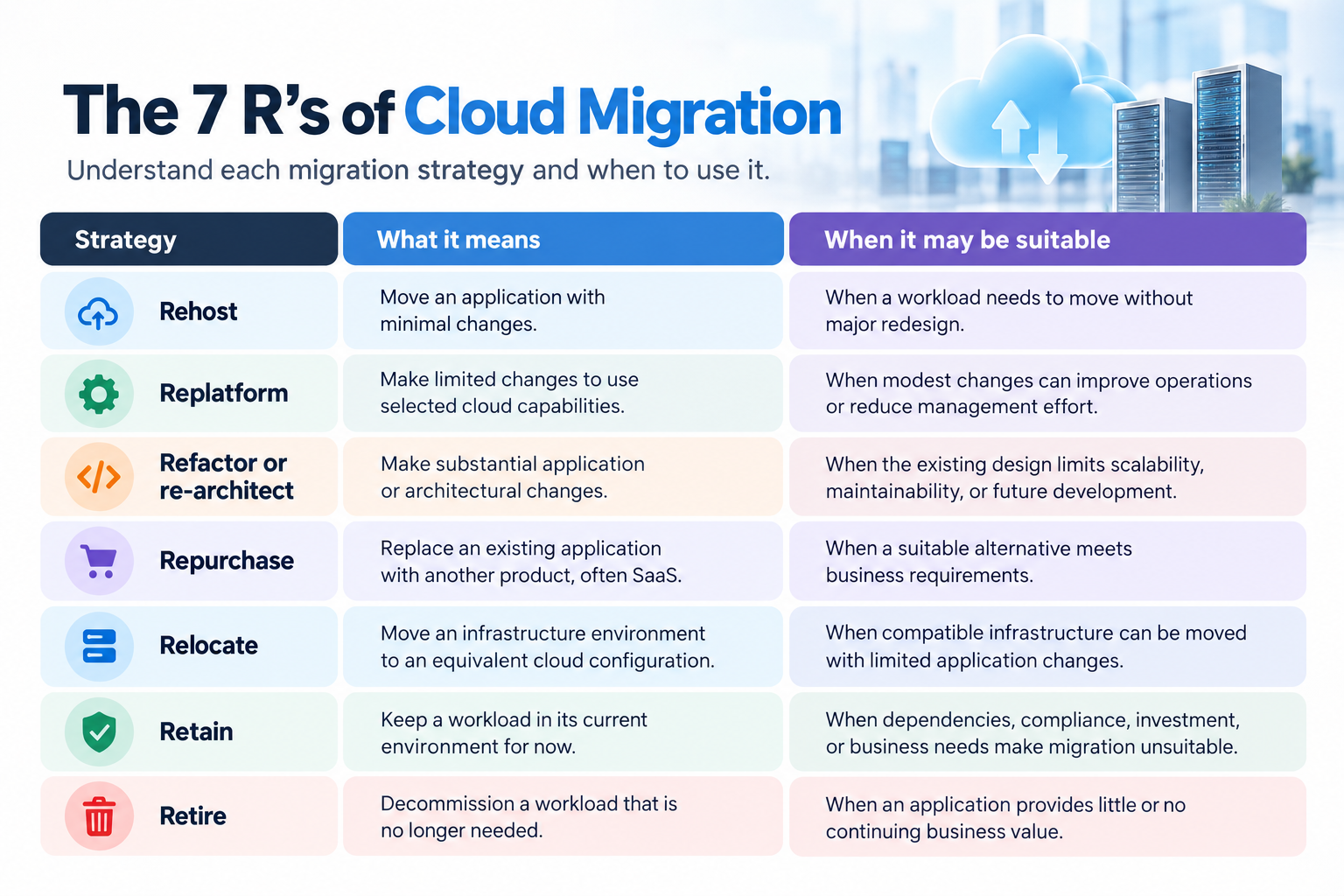
These approaches are not interchangeable, and one business may use several of them across its application portfolio. AWS documents these seven strategies in its cloud migration strategy guidance.
The right choice depends on the workload, expected benefits, migration risks, available resources, and modernization goals.
Should You Migrate to AWS or Another Cloud Platform?
Choosing a cloud platform should follow an assessment of your business and technical requirements.
Amazon Web Services (AWS), Microsoft Azure, and Google Cloud offer different services and capabilities. The best fit depends on factors such as existing technologies, application dependencies, data requirements, security and governance needs, operational skills, and expected costs.
AWS may be a suitable option for businesses looking to move applications and databases, adopt managed services, modernize software, or build cloud-based solutions. However, it is not automatically the right choice for every workload.
If you are considering AWS, explore AWS Cloud Development Services from Genius Bytes to learn more about cloud development and modernization capabilities. Select the most relevant service page on the website when publishing this link.
Before choosing a provider, compare the total cost of ownership, required services, migration effort, integration requirements, and long-term operating model.
Should You Handle Cloud Migration In-House or Hire a Cloud Migration Company?
The decision depends on your internal expertise, application complexity, timeline, and risk tolerance.
An experienced internal team may be able to migrate straightforward workloads when it has the right skills, resources, and established processes. External support may be valuable when applications have complex dependencies, security requirements, demanding availability targets, or significant modernization needs.
When evaluating cloud migration services, look for a provider that can help with:
- Infrastructure and application assessment.
- Cloud architecture and migration planning.
- Application and database migration.
- Security and governance considerations.
- Testing, cutover, and rollback planning.
- Post-migration monitoring and cost optimization.
Ask potential providers how they assess workloads, manage risks, document decisions, and measure success. Ensure their proposed scope matches your actual requirements.
At Genius Bytes, cloud development capabilities can support businesses evaluating AWS cloud development, application modernization, and related software engineering needs. The appropriate engagement should begin with your current environment, desired outcomes, and technical priorities—not a one-size-fits-all migration plan.
Planning a cloud migration? Contact Genius Bytes to discuss your business requirements and explore your next steps.
Conclusion
Cloud migration can help businesses adapt their technology to changing operational needs, support application modernization, and build a more flexible digital foundation. But moving to the cloud is not the right answer for every workload, and the benefits depend on how the migration is planned and managed.
Start by identifying the challenges in your current environment, defining measurable goals, assessing application readiness, and comparing the costs and risks of available options.
A clear cloud migration strategy can help you decide what to move, what to modernize, and what to keep where it is.
Ready to explore your cloud migration options? Genius Bytes can help you discuss cloud development and application modernization requirements based on your business goals and existing technology environment.
Ready to move to the cloud?
Let’s find the right cloud migration strategy for your business.
FAQs
The right time to migrate to the cloud is when your existing infrastructure limits scalability, increases maintenance costs, or makes application modernization difficult. Before migrating, assess your business goals, application dependencies, security requirements, budget, and technical readiness.
The 7 R's of cloud migration are Rehost, Replatform, Refactor (or Re-architect), Repurchase, Relocate, Retain, and Retire. These strategies help businesses decide how to handle each workload based on its complexity, cost, business value, and modernization requirements.
The main types of cloud migration include moving applications from on-premises infrastructure to the cloud, migrating between cloud providers, moving from one cloud environment to another, and adopting a hybrid cloud setup. Businesses may also modernize applications during migration to improve scalability, performance, and maintainability. The right approach depends on business goals, technical requirements, security needs, and budget.
The term “3-4-5 rule” does not have one universally accepted definition across cloud computing. Its meaning can vary depending on the provider or context in which it is used. When planning cloud migration, businesses should focus on established principles such as workload assessment, security, cost management, scalability, and recovery planning rather than assuming the term refers to a standard migration framework.
Cloud migration best practices include assessing your existing infrastructure, mapping application dependencies, defining measurable business goals, selecting the right migration strategy, planning security and compliance, estimating costs, testing workloads, and migrating in phases where appropriate. After migration, monitor performance, optimize resource usage, and validate backup and recovery processes.
Cloud migration can improve scalability, provide access to managed services, support application modernization, and offer greater operational flexibility. It can also help businesses improve backup and disaster recovery capabilities. The actual benefits depend on workload suitability, architecture, implementation, and ongoing cloud management.
Cloud migration costs depend on the number and complexity of applications, data volumes, infrastructure requirements, licensing, testing, and specialist support. Businesses should consider both one-time migration expenses and ongoing cloud operating costs when developing a budget.
Cloud migration can take anywhere from a short period for a simple workload to several months or longer for complex applications and large infrastructure environments. The timeline depends on application dependencies, data volumes, security requirements, testing, and the chosen migration strategy.
Yes. Cloud migration can help small businesses access scalable infrastructure and managed services without maintaining all their own physical infrastructure. Starting with selected workloads can help control costs and complexity while allowing the business to evaluate the results before expanding.
Businesses may benefit from a cloud migration services provider when they lack internal expertise or need support with complex applications, integrations, security requirements, or modernization. A suitable provider can help assess the existing environment, develop a migration strategy, plan implementation, and optimize workloads after migration.